Mastering Clown Fish 3D SVG Multilayer Files for Precision Laser Cutting
The intersection of digital design and physical craftsmanship has never been more accessible, yet it remains fraught with subtle pitfalls that can ruin a project before the first cut is made. For creators looking to produce stunning dimensional art, Clown Fish 3D SVG Multilayer Files offer a compelling solution. These designs are not merely flat illustrations; they are engineered blueprints for depth, shadow, and texture. However, many hobbyists and small business owners approach these files with the same casual attitude they apply to simple vinyl decals. This misconception often leads to wasted material, frustrated customers, and compromised structural integrity.
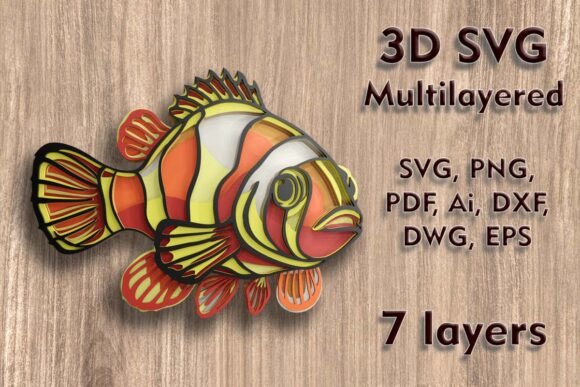
Understanding the mechanics behind a seven-layer mandala-style design is crucial. The specific Clown Fish Mundala Svg is a complex assembly where each layer serves a distinct visual purpose. When you purchase this asset, you are acquiring a toolkit for creating enchanting home wall decor. But the difference between a professional-grade piece and a warped, disjointed craft lies in how you handle the technical specifications and material choices.
The Critical Importance of Scale and Proportion
One of the most frequent errors observed in multilayer laser cutting is the improper resizing of vector files. The standard dimensions for this particular design are 201 mm width by 152 mm height (approximately 7.91 x 5.99 inches). While digital vectors are theoretically infinitely scalable, physical materials are not. The design relies on delicate bridges and thin connecting elements to maintain the intricate details of the clownfish and its surrounding mandala patterns.
When users arbitrarily shrink the design to fit a smaller frame or ornament, they often fail to account for the kerf—the width of the material removed by the laser beam—and the minimum viable thickness of the material itself. If you reduce the overall size significantly, those thin elements may become too fragile to survive the weeding process or may burn away entirely during cutting. Conversely, increasing the size is generally safer, but it requires ensuring your machine’s bed can accommodate the larger footprint without losing calibration accuracy.
Practical Advice: Before resizing, inspect the thinnest lines in the preview. If you must reduce the size, consider simplifying the design or switching to a thinner material like cardstock instead of plywood. Always perform a test cut on a scrap piece of your chosen material to verify that the smallest details remain intact.
Material Selection: Beyond Basic Plywood
The versatility of Clown Fish 3D SVG Multilayer Laser Cutting Files is one of its strongest selling points, supporting materials ranging from plywood and MDF to acrylic, aluminum, paper, and cardboard. However, treating all these materials identically is a recipe for disaster. Each substrate interacts with laser energy and adhesive differently.
- Plywood and MDF: These are ideal for rigid wall art. However, lower-grade plywood often contains voids or uneven glue layers that can cause inconsistent cutting depths. Always sand your layers lightly before assembly to ensure a smooth finish.
- Paper and Cardstock: Perfect for greeting cards or lightweight decor. The challenge here is warping. Using too much adhesive can cause paper fibers to swell and distort the precise alignment of the seven layers.
- Acrylic and Aluminum: These require specific laser settings (often higher power and slower speed for acrylic, or fiber lasers for metal). Acrylic edges will melt smooth, which is desirable, but masking tape is essential to prevent smoke staining on the surface.
A common oversight is ignoring the weight implications of the material. A seven-layer piece cut from 3mm plywood will be significantly heavier than one cut from cardstock. If you are creating hanging decor, you must reinforce the backing layer or use robust hanging hardware. Failing to plan for weight can result in the artwork detaching from the wall, damaging both the piece and the surface it hangs on.
Navigating File Formats and Software Compatibility
Upon purchase, you receive a ZIP folder containing a myriad of formats: SVG, layered SVG, DXF, DWG, EPS, AI, PNG, and PDF. Beginners often make the mistake of opening the wrong file type for their workflow. For instance, using a flattened PNG for a laser cutter defeats the purpose of the multilayer design, as it lacks the separate vector paths needed for depth.
For Cricut and Silhouette users, the layered SVG is the gold standard. It preserves the individual color-coded layers, allowing you to assign different cut settings or material types to each stratum within your design software. CNC router users should prioritize DXF or DWG files, as these formats better preserve the geometric precision required for toolpath generation. Adobe Illustrator or Inkscape users will find the AI and EPS files most editable, allowing for custom modifications to the mandala elements if desired.
Warning: Do not assume that "layered" means "pre-assembled." You must still manually align the layers in your software if you intend to change colors or adjust spacing. Always check the layer order before sending the job to your machine. A reversed layer stack can obscure critical details of the clownfish’s face or fins.
Assembly Techniques for Professional Results
The final product’s quality is determined less by the cut and more by the assembly. With seven distinct layers, alignment tolerance is minimal. A shift of even one millimeter can make the design look sloppy. Many creators rush this stage, using wet glues that take too long to set, causing layers to slide out of position.
To achieve a crisp, professional look, consider using spray adhesives or double-sided transfer tape for paper and cardstock projects. For wood and acrylic, cyanoacrylate (super glue) or specialized model cement provides a strong, fast bond. Use registration marks or a lightbox to align each layer perfectly before adhering. Start from the back layer and work your way forward, checking alignment from multiple angles under bright light.
Maximizing Value for Small Businesses and Educators
For entrepreneurs and educators, these files represent more than just a single project. They are a template for learning spatial reasoning and digital fabrication. When integrating Clown Fish 3D SVG Multilayer Files into a curriculum or product line, consistency is key. Document your machine settings for each material type. Create a standard operating procedure for assembly. This reduces waste and ensures that every piece you sell or teach meets a high standard of quality.
Remember, the goal is to unlock the magic of the season or create lasting home decor. By respecting the technical constraints of the design—specifically regarding size reduction and material compatibility—you transform a simple download into a masterpiece. Avoid the common traps of hasty resizing and inappropriate material pairing. Instead, approach each cut with intention, verifying your settings and aligning your layers with care. The result is not just a clownfish; it is a testament to the precision and creativity that modern crafting tools enable.
Whether you are upgrading your crafting portfolio with a Cricut, refining your laser cutting skills with a Glowforge, or exploring CNC routing, this design serves as an excellent benchmark for your capabilities. Treat the file with the respect it deserves, and it will reward you with a stunning, multidimensional piece of art that captivates viewers and elevates your creative brand.