Creating Dimensional Decor with Teapot 3D SVG Multilayer Laser Cut Files
In the evolving world of digital crafting and precision manufacturing, the demand for projects that offer depth, texture, and visual intrigue is higher than ever. Flat designs, while classic, often fail to capture the eye in the same way that layered, three-dimensional art does. This is where the Teapot 3D SVG Multilayer Laser Cut Files come into play, offering a sophisticated solution for makers who want to elevate their home decor or gift-giving game. Whether you are operating a high-powered industrial laser cutter, a desktop Glowforge, or a blade-based machine like a Cricut or Silhouette, this design provides a structured pathway to creating stunning wall art.
The concept behind multilayered SVG designs is simple yet profound: by stacking multiple sheets of material, each cut with specific shapes and voids, you create shadows and contours that mimic sculpture. The teapot motif, specifically the "Mundala" style referenced in this design package, combines the comforting familiarity of tea culture with intricate geometric patterns. This article explores how to effectively utilize these files, the materials best suited for the job, and the practical considerations necessary to ensure a professional-grade finish.
Understanding the Design Structure and Versatility
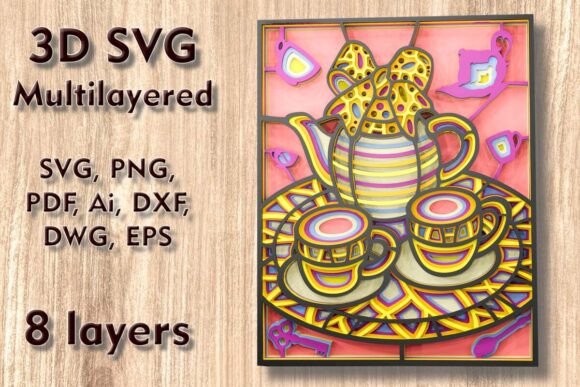
At its core, the Teapot 3D SVG Multilayer Laser Cutting Files package is not just a single image; it is a comprehensive toolkit for fabrication. The design consists of eight separate layers. This layering is crucial because it dictates the depth of the final piece. Each layer serves a specific purpose, from the foundational base that anchors the artwork to the topmost details that provide the finest visual resolution.
One of the primary advantages of this specific file set is its adaptability. The default dimensions are set at 250 mm in height and 200 mm in width (approximately 9.8 x 7.9 inches). This size is ideal for standard wall spaces, shelf displays, or as a centerpiece for a gallery wall. However, crafters often need to adjust dimensions to fit specific frames or spatial requirements. The vector nature of the included files allows for easy scaling up. If you wish to create a statement piece for a large living room wall, you can increase the size significantly without losing quality, provided your machine’s bed size allows for it.
However, a word of caution is necessary regarding scaling down. While increasing the size is generally safe, reducing the design requires careful attention. The intricate elements of the teapot and the mandala patterns contain thin lines and delicate bridges. If you reduce the overall dimensions too aggressively, these thin elements may become too fragile to handle or may burn away entirely during the laser cutting process. It is recommended to test cut a small section if you plan to scale the design down by more than 20% to ensure structural integrity.
Material Selection for Optimal Results
The versatility of the Teapot 3D SVG Multilayer Laser Cut Files is further highlighted by the wide range of compatible materials. The choice of material dramatically alters the aesthetic and functional outcome of the project. Here is how different materials interact with this eight-layer design:
- Plywood and Wood: This is the most popular choice for laser-cut wall art. Plywood offers a natural grain that adds warmth to the teapot design. When layered, the edges reveal the ply structure, adding a subtle textural contrast. Hardwoods can also be used for a more premium, durable finish, though they may require slower cutting speeds.
- MDF (Medium Density Fiberboard): MDF provides a smooth, uniform surface that is excellent for painting. If you plan to paint your teapot art in solid colors or metallic finishes, MDF is an ideal substrate because it lacks the grain variation of plywood.
- Acrylic: For a modern, sleek look, acrylic sheets can be used. Layering transparent or translucent colored acrylics can create fascinating light-play effects, especially if the artwork is backlit. Acrylic requires precise focus settings to achieve clean, flame-polished edges.
- Paper, Cardstock, and Cardboard: These materials are perfect for users who do not have access to laser cutters but own blade machines like Cricut or Silhouette. Paper layering creates a soft, matte aesthetic that is lightweight and easy to frame. It is also an excellent option for creating greeting cards or smaller gift items.
- Aluminum: For advanced users with CNC capabilities or specialized laser setups, thin aluminum sheets can be used to create an industrial-chic variant of the design. This requires significant technical expertise regarding feed rates and tooling.
When selecting your material, consider the thickness. Standard 3mm (1/8 inch) plywood or acrylic is commonly used for such multilayer projects. Using consistent thickness across all eight layers ensures that the stacking alignment remains true and the final depth is uniform.
File Formats and Machine Compatibility
Upon purchase, you receive a ZIP folder containing a diverse array of file formats, ensuring compatibility with virtually any modern cutting software. Understanding which file to use for your specific workflow is key to a smooth production process.
For laser cutter users, the DXF and DWG files are industry standards, compatible with software like AutoCAD, LightBurn, and RDWorks. These formats preserve the vector paths necessary for precise cutting. The SVG and layered SVG files are particularly useful for users of Glowforge or browser-based design tools, as they often retain layer information that simplifies the setup process. Adobe Illustrator and Inkscape users will appreciate the AI and EPS files, which allow for easy editing of individual elements before sending them to the cutter.
If you are using a blade cutter like a Cricut or Silhouette, the SVG and PNG files are your best friends. The layered SVG allows you to import the design directly into Design Space or Silhouette Studio, where you can assign different cut lines to each layer. The PDF format serves as a reliable backup for viewing the design layout and ensuring that all eight layers are present and accounted for before you begin your project.
Practical Applications and Assembly Tips
The end goal of using Teapot 3D SVG Multilayer Laser Cut Files is to create a piece of art that resonates with viewers. The applications are diverse. For home decor, this piece works beautifully in kitchens, dining areas, or cozy reading nooks where the theme of tea and relaxation is appropriate. It also makes for a thoughtful, handmade gift for tea enthusiasts, housewarmings, or birthdays.
Assembly is the final critical step. To achieve the 3D effect, you must stack the eight layers in the correct order. It is highly recommended to dry-fit the pieces before applying any adhesive. Use a light box or a bright window to align the layers perfectly. Once aligned, apply a strong wood glue or clear craft adhesive between each layer. Clamping the piece gently while the glue dries ensures a tight bond without squeezing out excessive adhesive that might mar the surface.
For those using paper or cardstock, double-sided foam tape can be used between layers to create even more pronounced shadows and depth, enhancing the 3D illusion without the permanence of glue. This method also allows for easier disassembly if mistakes are made during alignment.
Tailoring the Project to Your Skill Level
Different users will approach the Teapot 3D SVG Multilayer Laser Cut Files differently based on their equipment and experience. Beginners should start with paper or cardstock to understand the layering logic without the cost of wasted wood or acrylic. This low-stakes practice helps in mastering the alignment process. Intermediate crafters with laser cutters should experiment with plywood, focusing on optimizing power and speed settings to minimize charring. Advanced users might explore mixed media, combining wood bases with acrylic accents or integrating LED lighting behind the layers to highlight the mandala details.
Ultimately, this design file is more than just a digital download; it is a resource for creativity. By providing a well-structured, multi-format, and scalable design, it removes the technical barriers of creating complex 3D art, allowing you to focus on the joy of making. Whether you are upgrading your crafting portfolio or looking for a unique way to decorate your home, these files offer a reliable and beautiful solution.