Mastering Depth: A Guide to Rose 3D SVG Multilayer Cutting Files for Precision Craftsmanship
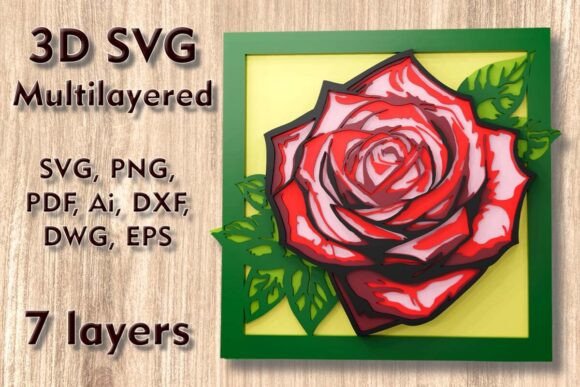
In the evolving landscape of digital fabrication, the transition from two-dimensional cuts to three-dimensional assembled art represents a significant leap in creative potential. Among the most captivating designs available for modern makers is the Rose 3D SVG Multilayer Cutting Files collection. This specific design archetype allows hobbyists and professional artisans alike to transform flat sheets of material into intricate, shadow-casting wall decor. By leveraging the capabilities of laser cutters, CNC routers, and blade-based cutting machines, creators can produce stunning floral motifs that possess genuine depth and texture.
The appeal of multilayered designs lies not just in their aesthetic beauty but in the technical challenge they present. Successfully executing a five-layer rose requires an understanding of material properties, machine calibration, and assembly techniques. This guide explores the practical applications, material considerations, and workflow optimizations necessary to bring these digital files to life, ensuring that your final output matches the precision of the original design intent.
Understanding the Design Architecture
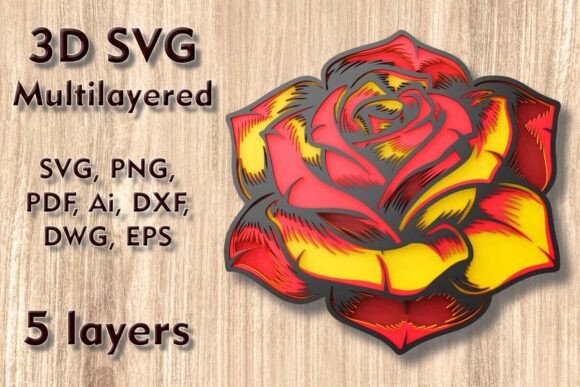
The core of this project is a sophisticated digital blueprint known as Rose Mundala Svg. Unlike standard vector graphics that rely on a single plane, this design is engineered with depth in mind. It consists of five separate layers, each meticulously calculated to stack upon the previous one, creating a graduated relief effect. The overall dimensions are set at 250 mm width by 240 mm height (approximately 9.9 x 9.5 inches). This size is strategic; it is large enough to serve as a standalone piece of home wall decor yet compact enough to fit within the working areas of most desktop cutting machines.
One of the critical aspects of working with such detailed vectors is scalability. While the design allows for size increases, which generally maintain structural integrity, reducing the scale requires extreme caution. As the overall footprint shrinks, the thin elements connecting the petals and the intricate details of the mandala-style center become increasingly fragile. If scaled down too aggressively, these delicate bridges may break during the weeding process or fail to hold together during assembly. Therefore, maintaining the recommended dimensions or scaling up is advisable for beginners, while experienced users might experiment with minor reductions provided they adjust their cutting settings to accommodate finer tolerances.
Material Selection and Compatibility
The versatility of the Rose 3d SVG Multilayer Cutting Files is evident in the broad spectrum of materials supported. The choice of substrate dramatically influences the final aesthetic and the required machine settings. The design is compatible with:
- Plywood and Wood: Ideal for laser cutters and CNC machines. Birch plywood, in particular, offers a smooth edge and consistent density, allowing for clean cuts without excessive charring. The natural grain adds warmth to the floral design.
- MDF (Medium Density Fiberboard): Provides a uniform surface free of knots, making it excellent for painting or staining after assembly. It cuts cleanly on lasers but produces more smoke, requiring adequate ventilation.
- Acrylic: For a modern, translucent look, acrylic layers can create fascinating light-play effects. However, acrylic requires different feed rates and power settings to prevent melting or fusing layers together.
- Paper, Cardstock, and Cardboard: Perfect for Cricut and Silhouette users. Layering colored cardstock can eliminate the need for painting, allowing the creator to build color gradients directly into the physical structure.
- Aluminum: Advanced users with appropriate CNC setups can cut thin aluminum sheets, resulting in a durable, industrial-chic piece suitable for outdoor or high-traffic areas.
When selecting materials, consider the thickness relative to the layer count. With five layers, using overly thick material can result in a bulky final product where the side profiles become visually dominant. Conversely, material that is too thin may lack the structural rigidity needed to support the overhanging petals of the rose.
Workflow Integration Across Machines
The accessibility of this design stems from its compatibility with a wide array of fabrication tools. Whether you are operating a consumer-grade die-cutting machine or an industrial laser system, the file formats provided ensure seamless integration into your workflow.
Laser Cutting and CNC Routing
For owners of Glowforge, xTool, or industrial CNC routers, the Rose 3D SVG Multilayer Cutting Files offer a straightforward path to production. The DXF, DWG, and AI formats are particularly useful here, as they preserve vector precision without rasterization. When using a laser cutter, focus on kerf compensation. The beam width removes a small amount of material, which can affect how tightly the layers fit together if the design includes interlocking tabs. Test cuts on scrap material are essential to dial in power and speed settings, ensuring that the thin elements of the rose are not burned away entirely.
Blade-Based Cutting Systems
Cricut and Silhouette enthusiasts will find the layered SVG files and PNGs invaluable. These machines excel at handling paper, cardstock, and vinyl. The key to success with blade cutters is the "weeding" process—the removal of excess material from around the design. Because the rose features intricate internal cuts, using a strong grip mat and ensuring the blade is sharp is crucial. The PDF and PNG files can also be used for print-and-cut methods, allowing for printed textures on the petals before they are cut out and assembled.
Digital Asset Management and File Formats
Upon purchase, users receive a comprehensive ZIP folder containing every format necessary for diverse manufacturing processes. Understanding which file to use for which stage of production can save significant time and reduce errors.
- SVG and Layered SVG: These are the primary files for most cutting software. The layered version keeps each of the five tiers separate, allowing for easy color coding and individual toolpath generation.
- DXF and DWG: Standard formats for CAD software and CNC machining. These are ideal for users who need to modify the geometry or integrate the rose into a larger architectural plan.
- EPS and AI: Preferred by graphic designers using Adobe Illustrator or CorelDRAW. These formats allow for easy editing of anchor points and bezier curves if customization is required.
- PNG and PDF: Useful for previewing the design, creating instruction manuals, or utilizing print-and-cut workflows.
It is imperative to note that this transaction involves digital files only. No physical product will be shipped. This digital-first approach reduces waste and allows for immediate project initiation, but it places the responsibility of material sourcing and fabrication squarely on the creator.
Assembly Techniques for Professional Results
Cutting the layers is only half the battle; assembly determines the final visual impact. To achieve a professional finish with the Rose Mundala Svg, consider the following best practices:
Adhesive Selection: For wood and MDF, wood glue provides a strong bond but requires clamping time. For paper and cardstock, spray adhesives or double-sided tape sheets offer a cleaner application without warping the material. Acrylic may require specialized solvent cements for a seamless join.
Alignment Strategies: With five layers, even a millimeter of misalignment can distort the symmetry of the rose. Using registration marks or a jig can help ensure each layer is centered perfectly over the previous one. Some creators prefer to assemble the piece from the background layer forward, checking alignment at each step.
Finishing Touches: Sanding the edges of wooden layers before assembly can remove laser char and create a smoother profile. Painting or staining the edges before stacking can also add a refined look, highlighting the depth of each tier.
Expanding Creative Horizons
The Rose 3D SVG Multilayer Cutting Files are not limited to static wall art. Their modular nature invites experimentation. Creators have successfully adapted these designs into lampshades, where backlighting accentuates the layered shadows. Others have integrated them into furniture panels, adding a touch of organic elegance to cabinetry. The ability to swap materials means a single design can yield vastly different results—a rustic wooden rose for a farmhouse kitchen, or a sleek acrylic version for a modern office space.
By mastering the nuances of these multilayered files, makers elevate their craft from simple cutting to complex construction. The combination of precise digital design and tactile material manipulation results in pieces that are not only visually striking but also technically impressive. Whether you are enhancing your portfolio, creating unique home decor, or exploring the limits of your cutting machine, this rose design serves as an excellent medium for artistic and technical growth.