Creating Stunning 3D Cat Wall Art: A Guide to Multilayer SVG Laser Cut Files
In the evolving world of digital crafting and DIY home decor, few trends have captured the imagination quite like 3D multilayer laser cut art. This technique transforms flat materials into dimensional masterpieces, adding depth, shadow, and visual interest to any space. Among the most popular subjects for this craft are feline-themed designs, specifically the Cat Multilayer 3D SVG Laser Cut File. Whether you are a seasoned maker with a professional CNC router or a hobbyist using a desktop cutting machine, understanding how to utilize these files can elevate your creative projects significantly.
This article explores the intricacies of working with 3D cat SVGs, focusing on design specifications, material choices, and practical applications. By demystifying the process, we aim to help you create enchanting home wall decor that serves as a unique gift or a personal statement piece.
Understanding the Design: The Cat Mundala SVG
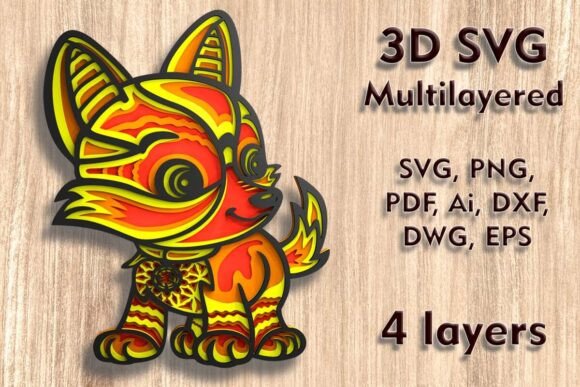
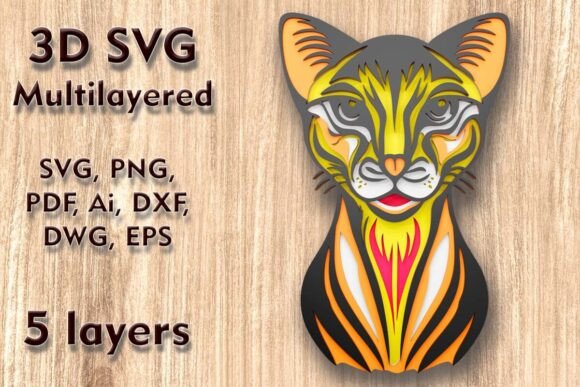
The centerpiece of this crafting journey is the Cat Mundala SVG, a sophisticated 3D multilayered design tailored for various cutting technologies. Unlike traditional 2D vector graphics, this file is engineered to be assembled in layers. The specific design discussed here features a standard dimension of 250 mm height by 160 mm width (approximately 9.85 x 6.3 inches). This size is ideal for shelf decor, desk accents, or small wall installations.
The design consists of five separate layers. Each layer represents a different depth plane, creating a parallax effect when stacked. The bottom layer usually serves as the background, while subsequent layers add details such as the cat’s silhouette, facial features, and decorative mandala elements. This layering technique is what gives the artwork its "3D" appearance, allowing light and shadow to play across the surface.
Why Layering Matters
Layering is not just an aesthetic choice; it is a structural one. In laser cutting and CNC machining, removing material creates voids. By stacking multiple sheets, you fill these voids with depth. For beginners, it is crucial to understand that each layer must align perfectly with the others. The layered SVG files provided in the download package are pre-separated to ensure this alignment, saving you hours of manual design work.
Material Selection: Beyond Wood
One of the most versatile aspects of the Cat 3D SVG Multilayer Laser Cutting Files is their compatibility with a wide range of materials. While wood is the traditional choice, modern crafters are experimenting with diverse substrates to achieve different looks and textures.
- Plywood and MDF: These are the most common choices for laser cutters like the Glowforge. They offer durability and a natural grain that enhances the organic feel of the cat design.
- Cardstock and Paper: Ideal for Cricut and Silhouette users. Paper layering allows for vibrant colors and intricate details that might be too fragile in wood.
- Acrylic: Using transparent or translucent acrylic can create a modern, glass-like effect, especially when backlit.
- Cardboard: An eco-friendly and cost-effective option, perfect for prototyping or rustic decor styles.
- Aluminum: For advanced users with fiber lasers or CNC mills, metal adds an industrial chic element to the design.
When selecting your material, consider the thickness. Most 3D SVG designs are optimized for materials between 2mm and 4mm thick. Using material that is too thick may prevent the layers from stacking neatly, while material that is too thin may lack structural integrity.
Technical Considerations: Sizing and Precision
A critical aspect of working with multilayer files is managing the scale. The provided design is sized at 250 H x 160 W mm. While it is tempting to resize designs to fit specific spaces, caution is advised. The size is easily increased, which generally poses no technical issues other than material cost. However, be careful in reducing the design.
Why? Because laser cutters and blade cutters have physical limitations. The design contains thin elements, such as the whiskers, mandala patterns, and fine details within the cat’s fur. If you shrink the overall dimensions too much, these thin bridges and lines may become too fragile to survive the cutting process or may burn away entirely during laser engraving. Always test cut a small section if you plan to scale down significantly.
File Formats and Compatibility
Accessibility is key in digital crafting. After purchase, users receive a ZIP folder containing a comprehensive suite of file formats to ensure compatibility with almost any machine:
- SVG and Layered SVG: The gold standard for web-based cutters like Cricut Design Space and Silhouette Studio.
- DXF and DWG: Essential for AutoCAD users and professional CNC routing software.
- EPS and AI: Preferred by graphic designers using Adobe Illustrator for further customization.
- PNG and PDF: Useful for previewing the design or printing paper templates for manual assembly.
This variety ensures that whether you are using a high-end industrial laser or a home hobbyist cutter, you can import the file without conversion errors.
Practical Applications and Creative Ideas
So, what can you actually make with these files? The versatility of the Cat Mundala SVG opens up numerous possibilities for home decor and gifting.
Home Wall Decor
The primary use case is enchanting home wall decor. By mounting the layered cat art on a contrasting background board, you create a focal point in living rooms, bedrooms, or nurseries. The 3D effect catches ambient light, changing the appearance of the piece throughout the day. For a modern look, consider painting each layer a different shade of the same color (an ombre effect) before assembly.
Greeting Cards and Gifts
Scaling the design down slightly (while respecting the thin element limits) allows for the creation of premium greeting cards. A 3D cat card made from cardstock is a memorable gift for cat lovers, birthdays, or holidays. The tactile nature of the layered paper adds a luxury feel that flat printed cards cannot match.
Seasonal Decor
Unlock the magic of the season by adapting the background layers. For Halloween, use black and orange cardstock. For Christmas, incorporate red and green tones with glitter accents. The core cat design remains constant, but the surrounding mandala elements can be customized to fit any holiday theme.
Step-by-Step Assembly Tips
Creating the final product requires patience and precision. Here is a brief guide to assembling your 3D cat art:
- Clean Your Layers: After cutting, remove any char marks (from laser cutting) or weed excess material (from blade cutting). Sanding wooden layers lightly can improve adhesion.
- Test Fit: Before applying glue, stack all five layers to ensure they align correctly. Use registration marks if provided in the file.
- Adhesive Choice: Use strong craft glue for paper/cardstock. For wood and MDF, wood glue or super glue works best. Apply sparingly to avoid oozing between layers.
- Weight It Down: Place a heavy book on the assembled piece while the glue dries to ensure a flat, uniform finish.
Conclusion
The Cat Multilayer 3D SVG Laser Cut File represents more than just a digital download; it is an invitation to explore the intersection of technology and traditional craftsmanship. By understanding the nuances of material selection, sizing constraints, and assembly techniques, you can transform simple sheets of plywood, paper, or acrylic into stunning works of art. Whether you are upgrading your crafting portfolio with a Cricut, Silhouette, or Glowforge, this design offers a accessible yet impressive project that resonates with cat lovers and design enthusiasts alike. Embrace the depth, enjoy the process, and let your creativity shine through every layer.